UML: what kind of beast is it, and why analysts steer clear
UML can visualize, specify and document a system — yet you almost never see it used on real teams. Let’s figure out what it’s for, why analysts avoid it, and where it actually pays off.
Everyone knows UML, hardly anyone draws it. Let’s be honest about what this tool actually is, why an analyst and a developer need it, and why half the teams out there have never laid eyes on it — even though they cheerfully talk it up in interviews.
What UML is and why it exists at all
UML (Unified Modeling Language) is a language you can use to "draw" a system before it gets written. Not pretty little boxes for a management deck, but a way to visualize, specify, design and document a software system — be it an application, an information system, or an integration landscape. Systems analysts and developers reach for it when they need to agree on how everything works while they’re still on dry land — while the cost of a mistake is a smudged arrow on a diagram, not a rewritten module in prod.
The key word here is "agree." UML doesn’t write code and it doesn’t replace your brain. It makes thought visible, so the whole team looks at one picture of the system instead of five different ones in five different heads. That’s its real superpower — the one people somehow forget in the endless "do we even need this UML of yours" arguments.
Five jobs UML actually gets done
If you sort the value into neat piles, you end up with five clear scenarios.
-
Visualizing the system. UML gives you a clear picture: how the structure is built and how the system behaves. That’s equally useful for the developer who’s going to write this tomorrow and for the stakeholder who wants to understand what they’re paying for in the first place. One diagram often saves an hour-long call where everyone tries to describe in words what’s far easier to just show.
-
Specifying requirements. Diagrams like Use Case pin down clearly what the system should be able to do and for whom. It’s disciplining: once the actors and scenarios are drawn, it gets much harder to "forget" a branch everyone vaguely suspected but nobody actually voiced. And the client and the team finally line up expectations against one picture instead of three different retellings.
-
Designing the system. Class and component diagrams help you design the architecture: see the main blocks, their responsibilities, and how they talk to each other. This is the moment when "let’s just do it like this" turns into a testable hypothesis — the diagram immediately shows where there are too many connections and where it’s going to hurt later.
-
Documenting the system. UML gives you a standardized way to capture the architecture and design. Not "Vasya keeps it all in his head," but an artifact that outlives Vasya quitting. For maintaining and evolving a system this is critical: without a map, a new person will wander through the code for months, assembling the picture piece by piece.
-
Communication within the team. Diagrams work as a shared language for analysts, developers and testers. Every term on the diagram means the same thing to everyone — and that sharply cuts the risk of the classic "broken telephone," where the client meant one thing, the analyst understood a second, and the developer built a third.
Sounds like it’d be a crime not to use it. But in practice things get more interesting.
Why analysts give UML a wide berth
Upsides are upsides, but UML isn’t exactly popular among systems analysts. For as many analysts as I know, only a handful ever get as far as diagrams. There are several reasons, and they’re all fair enough.
-
Agile simplified everything. Scrum and Kanban put the emphasis on fast, iterative movement, and documentation is often trimmed to the bare minimum. In that environment a heavyweight UML model easily starts to feel — and often genuinely is — excessive. Why polish a class diagram if half of those classes will move somewhere else in two sprints?
-
Time-expensive. Creating and, more importantly, maintaining diagrams takes effort, and the barrier to entry is high. On a fast-changing project the analyst picks whatever’s faster: a text description, a table, a napkin sketch in Miro. Formal UML loses not because it’s bad, but because it’s slower.
-
They flat-out can’t. Not everyone has the experience and the trained eye to apply UML meaningfully rather than "for show." Learning and practice take time, and that’s a barrier. Add to that the conveyor belt of "sorta-schools" stamping out "sorta-specialists" in three months, plus the influx of people from completely different fields — and you get a situation where, honestly, there’s no one left to pass the notation on. UML is a skill you pick up from practice and mentorship, not from a "get into IT over the weekend" course.
-
Tooling. Decent modeling tools aren’t always at hand: some are paid, others clunky, still others don’t fit the current stack. And drawing a serious model in whatever’s lying around is its own special kind of misery.
-
In-house corporate standards. Many companies have their own templates and documentation methods that simply don’t include UML. And arguing with a corporate standard for the sake of a pretty diagram usually costs you more than it’s worth.
So, draw it or drop it?
The right answer, as usual, is "it depends." UML isn’t a religion or an obligation. It’s a tool, and you should treat it like one: pull it out when it earns back the time you spend, and leave it alone when it turns into a ritual.
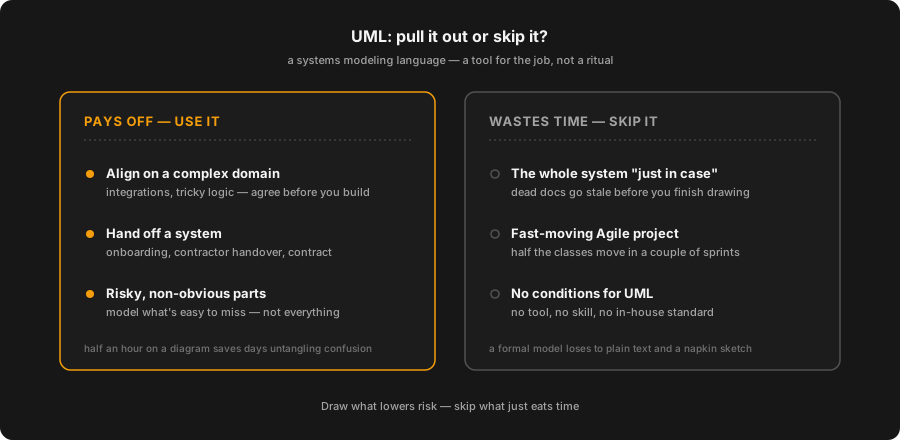
From experience, it pays off in two situations. The first is when the domain is complex and has to be agreed on between people: integrations, tricky business logic, scenarios where it’s easy to miss a branch. The second is when the system has to be handed over to someone: onboarding a newcomer, accepting a contractor’s work, an integration contract between teams. In both cases, half an hour on a diagram saves days of untangling misunderstandings.
Trying to draw the entire system "just because," on the other hand, is a straight road to dead documentation that goes stale before you finish the last arrow. The trick is to model not everything, but only the risky and non-obvious parts.
And even within UML, not all diagrams are equally useful. If you have to choose where to spend your energy:
| Diagram | When it actually pays off |
|---|---|
| Use Case | Agreeing with the client on what the system should be able to do, and for whom |
| Sequence | Working through a tricky interaction scenario: who sends what to whom, in what order |
| Component / context | Showing the big blocks and integrations — a must-have when handing over a system |
| Class | Only when the domain is complex and the structure matters enough to fix long-term |
| Activity / State | When there’s a non-trivial lifecycle or a branchy process |
Everything else — as the situation demands, and without fanaticism.
The takeaway is simple. UML is a powerful tool for modeling and documenting systems, but its applicability is bounded by the project’s specifics, the methodology, and the team’s level of preparation. Never using it at all means regularly stepping on the rake of misunderstanding. Trying to describe every single line with it means drowning in diagram maintenance. The working middle ground is simple: draw what lowers risk, and don’t draw what just eats time. So how’s it going with UML for you — do you draw, or did you drop it long ago?
Originally published on my Telegram channel @it_underside.
Yours, DPUPP
Related Articles
Event Storming Without the Hype: Pros, Cons, and a Sticky Note on Your Forehead
A personal take on Event Storming after more than one "event storm": where it genuinely saves a team, where it turns into pointless sticker-therapy, and what it takes to keep a session from going down the drain.
Data Exchange Formats: From JSON to Protobuf
A deep dive into data exchange formats: where JSON lives, why XML still matters, what makes YAML great, and when it is time to switch to binary Protobuf, Avro, and MessagePack — tied to APIs and message brokers.
UML: what kind of beast is it, and why analysts steer clear
UML can visualize, specify and document a system — yet you almost never see it used on real teams. Let’s figure out what it’s for, why analysts avoid it, and where it actually pays off.